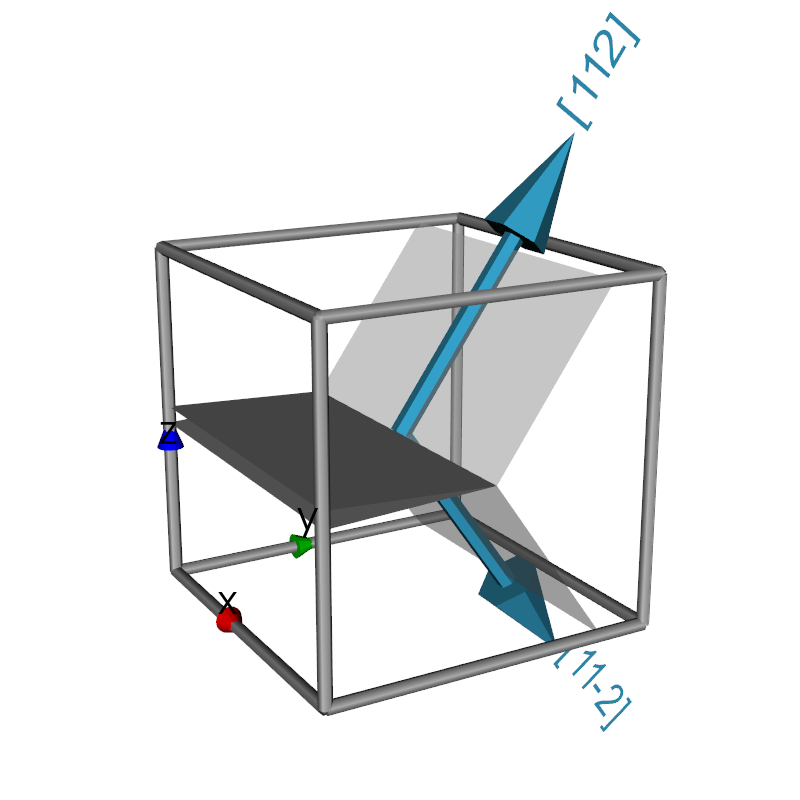
Python source code: cracked_single_crystal_with_slip_systems.py
from pymicro.crystal.microstructure import Orientation
from vtk.util.colors import peacock
from pymicro.view.scene3d import Scene3D
from pymicro.view.vtk_utils import *


def create_mesh_outline_3d_with_planes(lattice, orientation, nld):
    '''This is an example of custom vtk function to achieve a very specific
    goal. Here a cubic unstructured grid is used an an outline with two
    planes representing the crack faces and slip planes and directions.

    Finally a vtk assembly that can be added to a 3d scene is returned.
    '''
    grid = lattice_grid(lattice)
    assembly = vtk.vtkAssembly()
    # actor to show the mesh outline (only add edges)
    Edges = lattice_edges(grid)
    assembly.AddPart(Edges)
    # actor to show the crack
    top_crack_plane = vtk.vtkPlane()
    top_crack_plane.SetNormal(0, 0.025, 1)
    top_crack_plane.SetOrigin(0.5, 1.0, 0.5)
    top_crack_planeActor = add_plane_to_grid(top_crack_plane, grid, None, opacity=1.0)
    transform = vtk.vtkTransform()
    transform.Scale(1.0, 0.5, 1.0)
    top_crack_planeActor.SetUserTransform(transform)
    assembly.AddPart(top_crack_planeActor)
    bot_crack_plane = vtk.vtkPlane()
    bot_crack_plane.SetNormal(0, 0.025, -1)
    bot_crack_plane.SetOrigin(0.5, 1.0, 0.5)
    bot_crack_planeActor = add_plane_to_grid(bot_crack_plane, grid, None, opacity=1.0)
    transform = vtk.vtkTransform()
    transform.Scale(1.0, 0.5, 1.0)
    bot_crack_planeActor.SetUserTransform(transform)
    assembly.AddPart(bot_crack_planeActor)
    # actors to show the slip planes and directions
    B = orientation.orientation_matrix()
    Bt = B.transpose()
    for i in range(len(nld)):
        slip_normal = nld[i][0]
        slip_dir = nld[i][1]
        slip_dir_text = nld[i][2]
        slip_normal_rot = Bt.dot(slip_normal / numpy.linalg.norm(slip_normal))
        slip_dir_rot = Bt.dot(slip_dir / numpy.linalg.norm(slip_dir))
        plane = vtk.vtkPlane()
        plane.SetNormal(slip_normal_rot)
        plane.SetOrigin(0.5, 0.0, 0.5)  # origin at the left side center of the cell
        hklplaneActor = add_plane_to_grid(plane, grid, None, opacity=0.5)
        # add an arrow to display the normal to the plane
        slip_direction = numpy.cross((-1, 0, 0), slip_normal)
        arrowActor = unit_arrow_3d((0.5, 0.5, 0.5), slip_dir_rot, color=peacock)
        assembly.AddPart(arrowActor)
        # add a text actor to display the slip direction
        atext = vtk.vtkVectorText()
        atext.SetText(slip_dir_text)
        textMapper = vtk.vtkPolyDataMapper()
        textMapper.SetInputConnection(atext.GetOutputPort())
        textTransform = vtk.vtkTransform()
        start = (0.5, 0.5, 0.5) + slip_dir_rot
        Y = numpy.cross(slip_normal_rot, slip_dir_rot)
        m = vtk.vtkMatrix4x4()
        m.Identity()
        m.DeepCopy((1, 0, 0, start[0],
                    0, 1, 0, start[1],
                    0, 0, 1, start[2],
                    0, 0, 0, 1))
        # Create the direction cosine matrix
        for j in range(3):
            m.SetElement(j, 0, slip_dir_rot[j]);
            m.SetElement(j, 1, Y[j]);
            m.SetElement(j, 2, slip_normal_rot[j]);
        textTransform.Identity()
        textTransform.Concatenate(m)
        textTransform.RotateX(270 - i * 180)  # hack so that the vector text displays nicely
        textTransform.Scale(0.1, 0.1, 0.1)

        textActor = vtk.vtkActor()
        textActor.SetMapper(textMapper)
        textActor.SetUserTransform(textTransform)
        textActor.GetProperty().SetColor(peacock)
        assembly.AddPart(textActor)

        # translate to the crack tip
        transform = vtk.vtkTransform()
        transform.Translate(0.0, 0.5, 0.0)
        hklplaneActor.SetUserTransform(transform)
        assembly.AddPart(hklplaneActor)
    return assembly


'''
Create a 3d scene with the mesh outline.
Two planes are used to figure out the crack.
Both hkl planes are added at the crack tip and displayed.
'''

# Create the 3D scene
base_name = os.path.splitext(__file__)[0]
s3d = Scene3D(display=False, ren_size=(800, 800), name=base_name)

# specify the grain orientation
o1 = Orientation.from_euler(numpy.array([45., 0., 0.]))  # grain 1

# choose slip plane normals and directions to display in grain
n1 = numpy.array([1.0, 1.0, -1.0])
l1 = numpy.array([1.0, 1.0, 2.0])
d1 = '[112]'
n2 = numpy.array([1.0, 1.0, 1.0])
l2 = numpy.array([1.0, 1.0, -2.0])
d2 = '[11-2]'
nld = [[n1, l1, d1], [n2, l2, d2]]

# we use a unit lattice cell to represent the mesh
l_xyz = Lattice.face_centered_cubic(1.0)
g1 = create_mesh_outline_3d_with_planes(l_xyz, o1, nld)
s3d.add(g1)

# add axes actor
axes = axes_actor(0.5, fontSize=40)
s3d.add(axes)

# set up camera
cam = vtk.vtkCamera()
cam.SetViewUp(0, 0, 1)
cam.SetPosition(4.0, -1.5, 1.8)
cam.SetFocalPoint(0.5, 0.5, 0.6)
s3d.set_camera(cam)
s3d.render()

# thumbnail for the image gallery
from matplotlib import image

image_name = base_name + '.png'
image.thumbnail(image_name, 'thumb_' + image_name, 0.2)