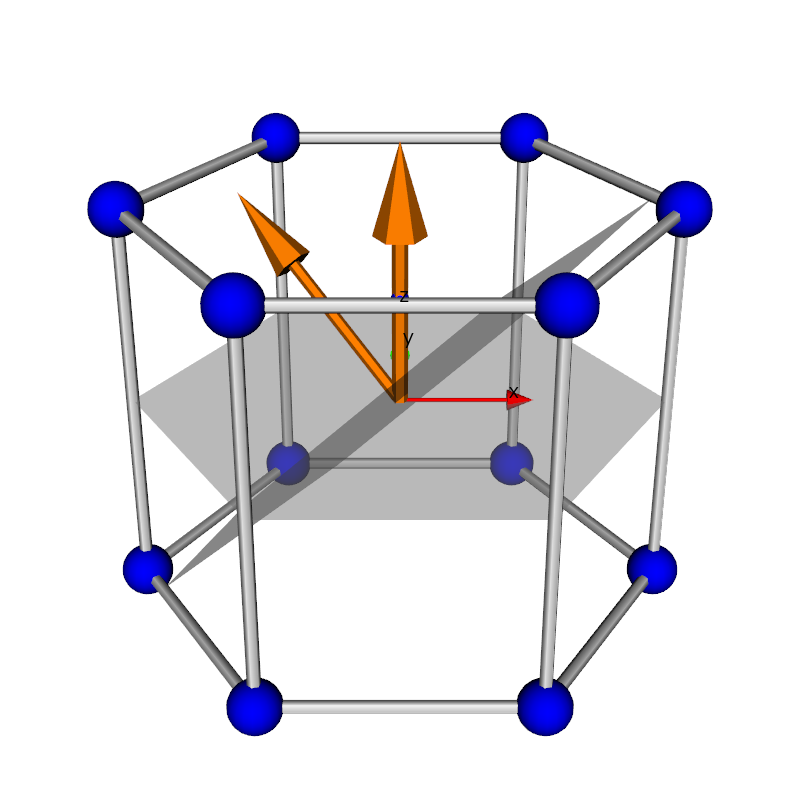
Python source code: hexagonal_crystal_3d.py
from pymicro.crystal.lattice import HklPlane
from pymicro.crystal.microstructure import Orientation
from math import sqrt
import numpy as np

'''
Create a 3d scene with a hexagonal crystal lattice.
Hkl planes are added to the lattice and displayed.
'''
# Create the Renderer and RenderWindow
ren = vtk.vtkRenderer()
ren.SetBackground(white)

# crystal orientation
o = Orientation.from_euler((15.0, -45.0, 0.0))
o = None

# hexagonal lattice
a = 1.0  # 0.321 # nm
c = 1.5  # 0.521 # nm
l = Lattice.hexagonal(a, c)
grid = hexagonal_lattice_grid(l)
print(np.array(HklPlane.four_to_three_indices(1, 0, -1, 0)) / 0.6)  # prismatic 1
print(np.array(HklPlane.four_to_three_indices(0, 1, -1, 0)) / 0.6) # prismatic 2
print(np.array(HklPlane.four_to_three_indices(0, 1, -1, 1)) / 0.6 * 3)  # pyramidal 1
print(np.array(HklPlane.four_to_three_indices(1, 1, -2, 2)) / 0.6 * 3)  # pyramidal 2
print(np.array(HklPlane.four_to_three_indices(0, 0, 0, 1)))  # basal
p1 = HklPlane(2., 1, 0, lattice=l)  # attach the plane to the hexagonal lattice
p2 = HklPlane(-1, 2, 0, lattice=l)
p3 = HklPlane(-3., 6., 5., lattice=l)
p4 = HklPlane(3, 9, 10, lattice=l)
p5 = HklPlane(0, 0, 1, lattice=l)  # basal
hklplanes = [p3, p5]
hexagon = vtk.vtkAssembly()
Edges = lattice_edges(grid, tubeRadius=0.025 * a)
Vertices = lattice_vertices(grid, sphereRadius=0.1 * a)
hexagon.AddPart(Edges)
hexagon.AddPart(Vertices)
hexagon.SetOrigin(a / 2, -a * sqrt(3) / 2., c / 2)
hexagon.AddPosition(-a / 2, a * sqrt(3) / 2., -c / 2)

# display all the hkl planes (with normal)
for hklplane in hklplanes:
    origin = (a / 2, -a * sqrt(3) / 2., c / 2)
    plane = vtk.vtkPlane()
    plane.SetOrigin(origin)
    plane.SetNormal(hklplane.normal())
    print('normal is', plane.GetNormal())
    hklplaneActor = add_plane_to_grid(plane, grid, origin, opacity=0.5)
    hexagon.AddPart(hklplaneActor)
    # add an arrow to display the normal to the plane
    arrowActor = unit_arrow_3d(origin, a * np.array(plane.GetNormal()), make_unit=False)
    hexagon.AddPart(arrowActor)

if o != None:
    apply_orientation_to_actor(hexagon, o)
ren.AddActor(hexagon)

# add axes actor
axes = axes_actor(0.5)
ren.AddViewProp(axes)

# set up camera and render
cam = setup_camera(size=(1, 1, 1))
cam.SetFocalPoint(0, 0, 0)
cam.SetPosition(0., -2, 1.0)  # change the position to something better
cam.Dolly(0.4)
ren.SetActiveCamera(cam)
image_name = os.path.splitext(__file__)[0] + '.png'
print('writting %s' % image_name)
render(ren, save=True, display=False, ren_size=(800, 800), name=image_name)
from matplotlib import image

image.thumbnail(image_name, 'thumb_' + image_name, 0.2)
print('done')