Scientific Data Management with Pymicro
One of Pymicro’s main goals is to help material scientists to handle the vast
amount of data of many kinds that is generated during the study of material
samples via various simulation of characterization techniques. To this end, a
specific data platform has been designed and implemented in the pymicro.core
package. It provides a data model, a file format, and an interface to
create, store, and work with material science datasets.
This page presents the different concepts and objects used for data management in Pymicro. It is followed by a step-by-step tutorial to master its practical use.
Pymicro’s Data Platform
The pymicro.core module has been designed to be an independent module. Its aim
is to serve as a prototype of what could constitute a generic data platform for
the material science community. It is centered on a main class, the
SampleData class.
The SampleData class is designed to handle all data modalities relevant to
material science, to bring them together and organize them into multimodal
datasets, and to reduce the technical complexity of data management for the end
user. The class provides two essential features:
A file format and a data model for these multimodal datasets
A high-level interface to interact with datasets
As its name suggests, it is designed to associate a dataset to each studied
material sample. Each SampleData class instance is associated to one dataset
file in memory. The class methods then provide the interface to interact with
the data contained in the dataset. The interface enables to:
Add, remove, and organize data of various types, formats, shapes into the same dataset.
Add, remove and organize light metadata for all elements of a dataset.
Get simple or detailed information on the dataset content.
Enable 3D visualization of spatially organized data (images, maps, measured or simulated fields).
Provide efficient and distinct compression options for each element of a dataset.
Provide a framework to automate interface between the datasets and data processing or numerical simulation tools.
Provide a framework to derive classes from SampleData that are specialized to a specific type of material samples, such as the
Microstructureclass of thepymicro.crystal.microstructuremodule.
File format
HDF5
SampleData associates to each class instance a HDF5 dataset file.
HDF5 is a library and file format
that supports an unlimited variety of datatypes, designed to store large data.
It is a hierarchical format: it allows to gather multiple data and create links
to organize them, creating an internal hierarchy that replicates a file system
within one single file. It also allows to add text metadata to all data elements
in the file, called HDF5 attributes.
The interface with HDF5 files implemented in SampleData is built on top of
the Pytables package, that extends the
HDF5 data model, and efficient data compression and I/O tools.
XDMF
In addition, the SampleData class can produce an XMDF file, associated to the
HDF5 dataset. XDMF is an extension
of XML file format that allows to provide a data model for arrays
representing spatially organized data, i.e. 2D or 3D data (fields).
Practically, it is an XML file containing the description, for each grid supporting the fields, of its topology, its geometry and its dimensions. It also provides the description of the fields defined on the grid (type, dimension), and enables to refer to data arrays stored in HDF5 data files to define their values. It can be seen as an light metadata file allowing softwares to interpret the raw binary data stored in an HDF5 file.
This XDMF/HDF5 file pair is a data format is used by data processing or numerical simulation softwares that are widely used by the material science community (Fenics, DAMASK, Dream3D…). HDF5/XDMF file pairs can be loaded by the powerfull and popular 3D visualization free software Paraview. This is a practical way to visualize 2D or 3D data stored into a *Pymicro* HDF5 dataset.
You will find below an example of a XDMF file associated to a HDF5 file:
<?xml version="1.0" ?>
<!DOCTYPE Xdmf SYSTEM "Xdmf.dtd" []>
<Xdmf xmlns:xi="http://www.w3.org/2003/XInclude" Version="2.2">
<Domain>
    <Grid Name="Particle Images" GridType="Uniform">
        <Topology TopologyType="3DCORECTMesh" Dimensions="400 300 300"/>
        <Geometry GeometryType="ORIGIN_DXDYDZ">
            <DataItem Name="Origin" Dimensions="3" NumberType="Float" Precision="4" Format="XML">
                            0 0 0
            </DataItem>
            <DataItem Name="Spacing" Dimensions="3" NumberType="Float" Precision="4" Format="XML">
                            1 1 1
            </DataItem>
        </Geometry>
        <Attribute Name="second 0" AttributeType="Scalar" Center="Node">
            <DataItem Format="HDF" NumberType="UInt" Precision="2" Dimensions="400 300 300">test.hdf:/images/0/image</DataItem>
        </Attribute>
    </Grid>
</Domain>
</Xdmf>
This file pair contains a 3D image (regular grid) of 400x300x300 voxels, that
supports a scalar field second 0, that is stored in the node
/images/0/image of the HDF5 file test.hdf5. The SampleData class
handles the automatic generation of such files to describe the HDF5 datasets,
and benefit from 3D visualization with Paraview.
Data Model
SampleData datasets comply with a specific data model. A data model is
the set of convention to store and read data that must be known to make sens out
of it. For instance, a three dimensional array of floating point vales may be
the X,Y,Z geometry for a grid or calculated vector values. Without a data model,
it is impossible to tell the difference.
The data model implemented within the SampleData class provides several
data items, that can be used to store the various types of data that must be
gather into material science datasets. These various items are briefly presented
here. Specific notebooks will follow to detail the features and interface for
each of these type of items.
HDF5 Data Model
Pymicro’s data model is built on top of the HDF5 data model. The latter is based on the following items:
Groups: a data structure that can be linked to other groups or datasets, and is used to organized data objects. They can been seen as the ‘directories’ of a HDF5 dataset. Every HDF5 file contains a root group that can contain other groups.
Data arrays or Nodes: arrays of data that can have different types/shapes, and are attached to a Group.
Attributes: Name/Value pairs just like in a Python dictionary. Values can take any form as long as they remain small (large arrays must not be stored as attributes). It is the way to store metadata into HDF5 files. Both Groups and Datasets can hold as many Attributes as required.
Pymicro’s Data Model
The SampleData data model introduces two types of particular HDF5 Groups.
They are dedicated to the representation of spatially organized data. Such data
consist in geometrical grids supporting data array representing field values.
These grids can be regular grids (images), or have more complex topologies
(meshes). Those two situations correspond to the 2 Group types in the data
model, that are:
Image Groups are HDF5 groups designed to store data describing 2D or 3D images, i.e. regular grids supporting scalar or tensorial fields. They are used for instance, to store data coming from SEM/EBSD or X-ray tomography imaging, or FFT-based simulation results. 3 sub-types of image groups are implemented:
2DImagegroups: two dimensional images, i.e. grids of \((N_x,N_y)\) pixels3DImagegroups: three dimensional images, i.e. grids of\((N_x,N_y, N_z)\) voxels
emptyImagegroups: image groups that do not support any data and topology yet
Mesh Groups are HDF5 groups designed to store data describing 2D or 3D meshes, i.e. grids described by node coordinates and elements connectivities, supporting scalar or tensorial fields. They can be used to store data coming from finite element simulations, CAD designs etc… 3 sub-types of mesh groups are implemented:
2DMeshgroups: two dimensional meshes, i.e. grid of nodes defined by their \((X_i,Y_i)\) coordinate pairs.3DMeshgroups: three dimensional meshes, i.e. grid of nodes defined by their \((X_i,Y_i,Z_i)\) coordinate pairs.emptyMeshgroups: represent mesh groups that do not support any data and topology yet.
In addition, the data model introduces two additional types of HDF5 Nodes:
Structured Tables are heterogeneous and bidimensional data arrays, i.e. that may contain data of different types (integers, floats, strings, sub arrays…) within the same row, all rows having the same format. Each column of those arrays can have a specific name. Those arrays are equivalent to Numpy structured arrays.
Fields are specific data arrays that must belong to a grid group (Image or Mesh Group), and whose shape and dimensions must comply with the grid topology. They are used to store and manipulate spatially organized arrays, that represent mechanical fields (for instance, displacement or temperature fields, microstructure phase maps, EBSD orientation maps….).
Those specific data objects introduced by SampleData all have a specific data
model, associated metadata, and a specific interface. Each one of them is the
subject of a dedicated Notebook in this User Guide.
Data Model example
To illustrate what SampleData datasets may look like, a virtual example of a
polycrystalline material sample dataset is represented in the schematic diagram
below:
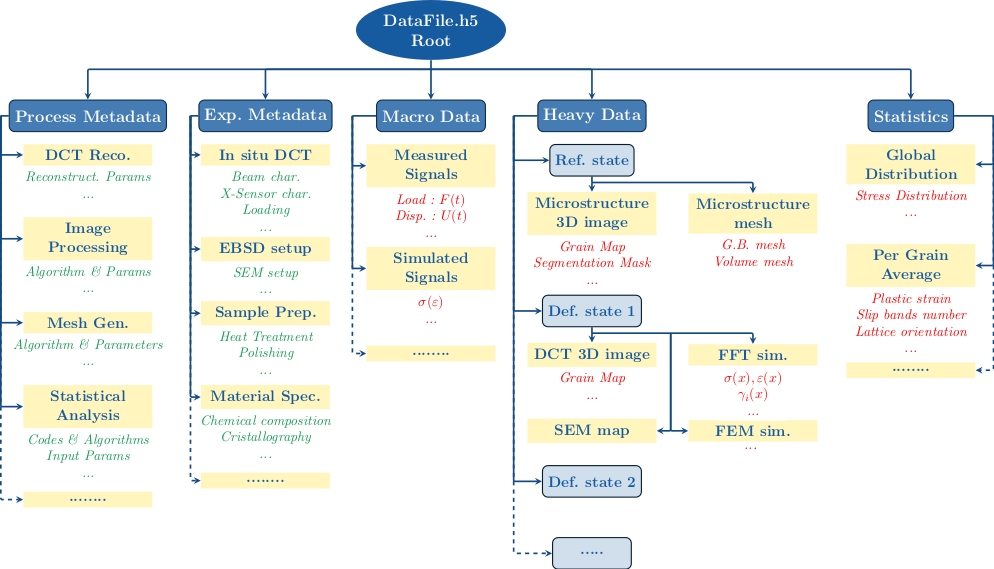
Groups are used to organize data into coherent categories. Metadata are represented in green, and datasets in red. As it appears on the diagram, Groups can be dedicated only to organize metadata, for instance to document material nature, composition, elaboration process, or the experimental set-up used for imaging and mechanical tests.
The Macro Data and Statistics Groups will typically contain simple arrays datasets or structured tables, to store mechanical tests outputs (loading curves) or some statistics on the microstructure geometry or mechanical state.
The Heavy Data group will typically contain the spatially organized data, coming from 3D or 2D in-situ imaging techniques, and simulation softwares. It will most likely contain Image or Mesh Groups, and contain Fields.